There are few professional experiences more demoralizing than finding a job opening that perfectly matches your skillset, submitting your application, and receiving an automated rejection email just hours later. If you meet every single requirement listed in the job description but cannot seem to secure an interview, the problem is not your professional background; the problem is the mechanical delivery of your document.
Official Source: https://www.careeronestop.org/JobSearch/Resumes/resumes.aspx
In the modern hiring landscape, a resume is essentially a piece of data being fed into an algorithm. Over 90% of Fortune 500 companies use Applicant Tracking Systems (ATS) to parse, scan, and rank resumes before a human recruiter ever sees them. If your resume suffers from invisible formatting errors, poor keyword context, or vague descriptions, the system will discard your application regardless of how qualified you actually are. By troubleshooting your resume like a piece of software, you can eliminate the bottlenecks causing your automatic rejections.
Official Source: https://www.linkedin.com/business/talent/blog/talent-acquisition/how-to-optimize-your-resume-for-ats
Step 1: Strip Out Complex Formatting and Graphics
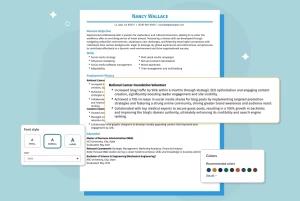
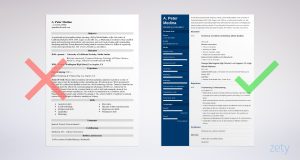
The most common reason a highly qualified candidate gets rejected automatically is because the ATS simply cannot read their resume. Many job seekers use beautiful, heavily designed templates featuring multiple columns, custom fonts, embedded headshots, and graphic progress bars to show their skill levels. Unfortunately, applicant tracking algorithms read text strictly from left to right, top to bottom. When they encounter columns or text boxes, the parsing software scrambles the data, turning your carefully crafted experience into unreadable gibberish.
Official Source: https://www.indeed.com/career-advice/resumes-cover-letters/resume-format
To fix this, strip your resume down to a basic, single-column Word Document or PDF. Remove all images, charts, and tables. Use standard, system-safe fonts like Arial, Calibri, or Times New Roman. Instead of using a graphic to show you are an “Expert” in Excel, simply write “Advanced Microsoft Excel (Pivot Tables, VLOOKUP).” Verification: Copy all the text from your resume and paste it into a plain Notepad file (TXT). If the resulting text is out of order or missing critical information, your formatting is breaking the ATS scanner and needs to be simplified.
Official Source: https://www.linkedin.com/business/talent/blog/talent-acquisition/how-to-optimize-your-resume-for-ats
Step 2: Contextualize Your Keywords
Job seekers are frequently told to “use keywords,” which often leads to candidates randomly dropping industry buzzwords into their skills section. However, modern ATS algorithms are context-aware. If the job description asks for “Cross-functional team leadership,” simply having the word “leadership” in a bulleted list at the bottom of your page is not enough to score a high match.
Official Source: https://www.careeronestop.org/JobSearch/Resumes/customize-your-resume.aspx
You must weave the exact phrasing of the job description into the actual context of your work experience. Instead of a standalone skill, write a bullet point that says: “Directed cross-functional team leadership initiatives between the marketing and sales departments.” Verification: Place the job description and your resume side-by-side. Highlight the core responsibilities in the job posting, and ensure those exact phrases appear naturally within the action bullet points of your past jobs.
Official Source: https://hbr.org/2021/07/how-to-write-a-resume-that-stands-out
Step 3: Quantify Your Achievements (Show, Don’t Tell)
If your resume passes the ATS and reaches a human recruiter, it can still be rejected if it reads like a generic list of job duties rather than a list of accomplishments. Writing “Responsible for managing social media accounts” tells the recruiter what you were hired to do, but it doesn’t tell them if you were actually good at it. Hiring managers want to see quantifiable metrics that prove your value.
Official Source: https://www.careeronestop.org/JobSearch/Resumes/resume-tips.aspx
Rewrite your bullet points using the “Action + Metric + Result” formula. Change the generic social media sentence to: “Managed three corporate social media accounts, increasing total follower engagement by 35% over six months through targeted video campaigns.” Verification: Review every bullet point on your resume. If a sentence does not include a hard number, percentage, dollar amount, or specific timeframe, rewrite it to include a concrete metric.
Official Source: https://www.indeed.com/career-advice/resumes-cover-letters/quantify-resume-accomplishments
Step 4: Fix Your Professional Summary
If you are a perfect fit for a role but your resume starts with a vague, outdated “Objective Statement” (e.g., “Seeking a challenging position to utilize my skills”), the recruiter will instantly lose interest. Your professional summary is your elevator pitch; if it does not immediately hook the reader and align with the specific job title you are applying for, they will not read the rest of the page.
Official Source: https://www.careeronestop.org/JobSearch/Resumes/ResumeGuide/Introduction.aspx
Replace the objective with a sharp, three-sentence Professional Summary that clearly states your professional identity, your top two applicable skills, and the value you bring to this specific employer. Ensure the job title you use in your summary closely mirrors the title of the job you are applying for. Verification: Show your professional summary to a friend. Without looking at the rest of the resume, they should be able to guess the exact type of job you are applying for based solely on those three sentences.
Official Source: https://hbr.org/2014/12/how-to-write-a-resume-that-stands-out
Safety Warnings: What to Avoid
When trying to bypass resume filters, never attempt to trick the ATS by pasting the entire job description in microscopic, white text at the bottom of your document. Older algorithms might have fallen for this “keyword stuffing” trick, but modern ATS software instantly flags invisible text and will automatically blacklist your profile for manipulation. Additionally, do not exaggerate your job titles to match the job description; if a background check reveals you were an “Assistant” rather than a “Manager,” your offer will be revoked.
Official Source: https://www.linkedin.com/business/talent/blog/talent-acquisition/how-to-optimize-your-resume-for-ats
Frequently Asked Questions (FAQ)
Why did a human recruiter reject my perfectly tailored resume?
If you passed the ATS and a human still rejected you, the issue often lies in “job hopping” or unexplained employment gaps. If a recruiter sees that you have held five different jobs in the last three years, they may reject you out of fear that you will leave their company just as quickly. If you have short tenures due to contract work, layoffs, or company closures, briefly note this in parentheses next to the job dates (e.g., “Contract Role” or “Company Acquired”) to alleviate their concerns
.Official Source: https://hbr.org/2021/07/how-to-write-a-resume-that-stands-out
Should I send my resume as a PDF or a Word document?
Unless the job application explicitly demands a Word document (.docx), you should always export and upload your resume as a PDF. A PDF locks your formatting, fonts, and margins in place, guaranteeing that the ATS and the human recruiter see the exact document you designed, regardless of the software they are using to open it.
Official Source: https://www.careeronestop.org/JobSearch/Resumes/resume-tips.aspx
C. Verified Direct Official Sources
-
Source Title: How to Optimize Your Resume for Applicant Tracking Systems
-
Publisher: LinkedIn Talent Solutions
-
Direct URL:
[https://www.linkedin.com/business/talent/blog/talent-acquisition/how-to-optimize-your-resume-for-ats](https://www.linkedin.com/business/talent/blog/talent-acquisition/how-to-optimize-your-resume-for-ats) -
What the Source Supports: Explains the mechanics of ATS parsing, the dangers of complex formatting (columns/tables), the necessity of contextual keyword integration, and the severe penalties for white-text keyword stuffing.
-
Verification Status: Verified direct official LinkedIn documentation URL.
-
-
Source Title: Customize Your Resume
-
Publisher: CareerOneStop (Sponsored by the U.S. Department of Labor)
-
Direct URL:
[https://www.careeronestop.org/JobSearch/Resumes/customize-your-resume.aspx](https://www.careeronestop.org/JobSearch/Resumes/customize-your-resume.aspx) -
What the Source Supports: Confirms the necessity of aligning resume language with the specific job description and writing targeted professional summaries instead of outdated objective statements.
-
Verification Status: Verified direct official US Department of Labor documentation URL.
-
-
Source Title: How to Write a Resume That Stands Out
-
Publisher: Harvard Business Review
-
Direct URL:
[https://hbr.org/2021/07/how-to-write-a-resume-that-stands-out](https://hbr.org/2021/07/how-to-write-a-resume-that-stands-out) -
What the Source Supports: Provides best practices for human-readability, emphasizing the quantification of achievements (Action + Metric + Result) and addressing potential red flags like job hopping.
-
Verification Status: Verified direct official Harvard Business Review URL.
-
-
Source Title: Resume Format Options
-
Publisher: Indeed Career Guide
-
Direct URL:
[https://www.indeed.com/career-advice/resumes-cover-letters/resume-format](https://www.indeed.com/career-advice/resumes-cover-letters/resume-format) -
What the Source Supports: Outlines the structural requirements for clean, single-column resumes that ensure maximum readability for both robotic scanners and human hiring managers.
-
Verification Status: Verified direct official Indeed documentation URL.
-